VIExplore products
MENU / DANTINO
Explore products
Tiếng Việt

Care in the making. Usefulness in the outcome.

Dantino · Physical Intelligence

Connect physical signalsto useful decisions.

Follow AI work with Bamboo Pulse on your Mac or explore Bamboo Bar for your desk. Discover RoomVital’s development direction for understanding bedroom conditions.

Explore products

Try the Bamboo Pulse beta, ask about Bamboo Bar pre-orders, or discuss a RoomVital pilot.

Care in the making. Usefulness in the outcome.

Software and connected products.

Find the product for your next step.

A visible status signal for AI work. A quieter way to understand your bedroom. Each starts with a specific problem.

Bamboo Pulse

Mac menu-bar app

Know when your AI needs you.

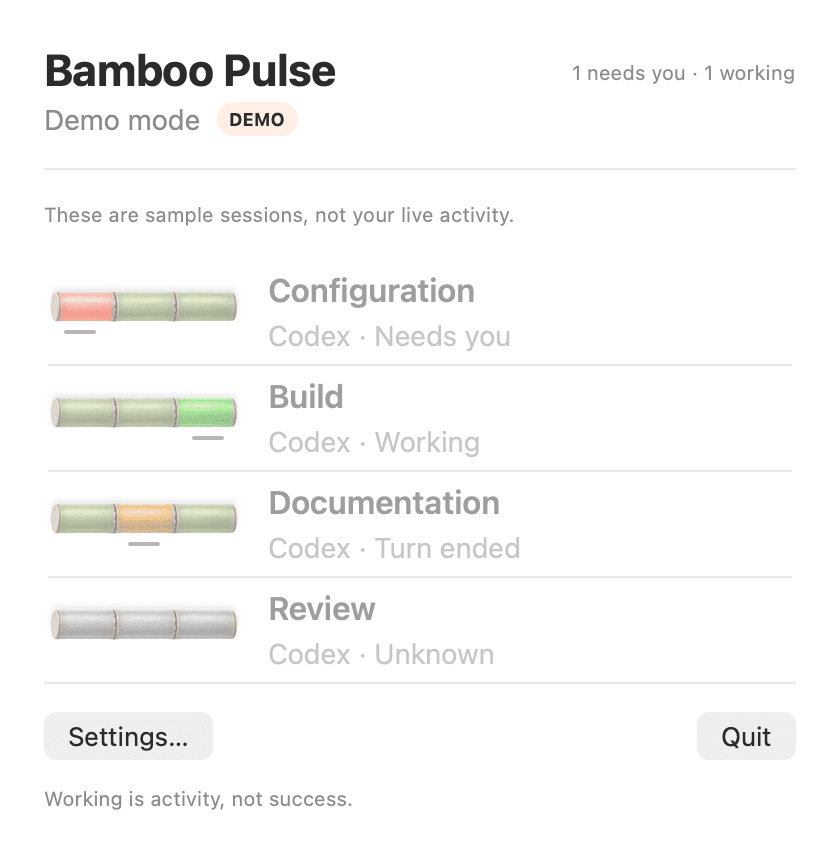
Follow session activity from your menu bar and return to the chat that needs attention.

For developers and product builders using local Codex chats.

Explore Bamboo Pulse

Public beta · Apple Silicon

Bamboo Pulse · Preview / Demo

From activity to attention

  1. Local Codex session
  2. Bamboo Pulse
  3. Return when needed

Local session status, optional notifications and a shortcut back to live chats.

App illustration uses sample sessions. Beta requirements apply; turn ended does not confirm success.
Bamboo Bar

AI status, at a glance

In the flow, then checking AI again?

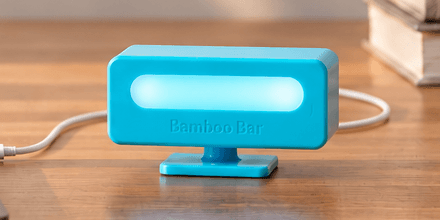
Follow agent status on your desk, so you know when to return to the app.

For developers and product builders using AI coding agents. First-batch setup: Mac, OpenAI Codex and USB via Bamboo Connect.

Explore Bamboo Bar

First-batch pre-orders

Bamboo Bar

Illustrative status flow

  1. AI agent
  2. Bamboo Connect
  3. Bamboo Bar

Bamboo Connect for Bamboo X connects agent status to light signals over USB, with optional attention vibration on supported configurations.

Status indication only. Bamboo Bar does not approve actions. Product images are illustrative; hardware and release qualification remain pending.

RoomVital

Understand the person–room relationship

Wake tired and wonder whether your bedroom plays a part?

RoomVital is being developed to connect bedroom conditions with qualified contactless observations, helping you choose one practical change to try.

For adults sleeping alone in a private bedroom who suspect room conditions play a part in their rest.

Discuss a RoomVital pilot

In development · Bedroom validation first

RoomVital experiment loop · development direction

  1. Measure
  2. Understand
  3. Try one change
  4. Compare again

Sen observes qualified contactless signals. Environ records room conditions. The App is designed to bring their records together in a private morning report.

Designed for local-first use without wearables or cameras. Observations are non-medical and do not establish cause. Missing or insufficient data must remain visible.

The RoomVital family

Separate products. Useful together.

RoomVital Home / SEN Home is our current bedroom-system focus. Environ and Sen are separate devices; the App brings qualified records together when room, time, and data-quality checks pass.

Current focus · In development

01

RoomVital Environ

Independent room sensing, warm ambient light, and a display. Planned Lite+ and Full variants have different sensing capabilities. Environ does not require Sen.

02

RoomVital Sen

A separate wall-mounted sensor designed for qualified contactless observations in a supported bedroom setup.

03

RoomVital App

Local-first setup, history, and interpretation. Designed to join Sen and Environ records into an honest morning observation and one practical change to try.

Shared technology direction

From the physical world to something useful.

We connect software and physical products around a useful signal. Bamboo Bar brings agent status to your desk. RoomVital explores person–room context. Each product has its own development and validation path.

  1. 01Physical signals
  2. 02Local processing
  3. 03Evidence or insight
Bamboo BarVisible AI agent status
RoomVitalPerson–room observations
Development direction · not a finished platform

Our philosophy

Care becomes credible through the product.

These commitments guide how we develop, test, and describe our work.

01

Care

Start with the person, the task, and the details that make a product easier to use.

02

Usefulness

Give each product a clear purpose and focus on a practical result.

03

Responsibility

Describe capabilities honestly, test the result, and take responsibility for what we make.

The next step

Choose your next step.

Try the Bamboo Pulse public beta. For hardware, tell us what matters in your context so we can discuss fit and current development limits.

  1. 01

    Explore a product

    Try Bamboo Pulse, explore Bamboo Bar, or choose a RoomVital use case.

  2. 02

    Share your use case

    Tell us about your room or workflow, and what you want to change.

  3. 03

    Discuss a pilot

    We’ll discuss fit and the current development limits before any next step.

Build with us

Want to discuss your workflow or room?

A useful product starts with a real need. Share yours, and let’s discuss whether a pilot is the right next step.

Discuss a pilot